
maven, gradle에 대해 알아보자 !
빌드 툴 ?
Maven
Maven은 프로젝트를 빌드하고 라이브러리를 관리해주는 도구입니다.
프로젝트의 규모가 커질수록 라이브러리의 관리가 어려워집니다. 모두 같은 환경에서 개발을 해야하는데 카톡이나 메일로 라이브러리를 보내주면서 게속 import 시켜주는 비효율적인 행위보다는 pom.xml만 공유하는게 훨씬 효율적이겠죠?
라이브러리를 관리해주는 또다른 장점은 필요한 라이브러리의 하위 라이브러리까지 버전에 맞게 받아주는 것입니다. 우리가 pom.xml를 통해 dependency에 추가를 해서 라이브러리를 설치했습니다. 만약 depedency에 작성한 라이브러리를 사용하기 위해 다른 라이브러리도 필요하다면 알아서 같이 설치를 해줍니다. 예를들어 spring-context 모듈은 spring-beans가 필요하고 spring-beans는 spring-core 모듈이 필요합니다. 그러면 dependency에 spring-context만 넣어주면 spring-beans와 spring-core를 같이 받아줍니다. 즉, 딱 필요한 라이브러리만 dependency에 작성하여 가독성을 높여 작업을 진행할 수 있습니다.
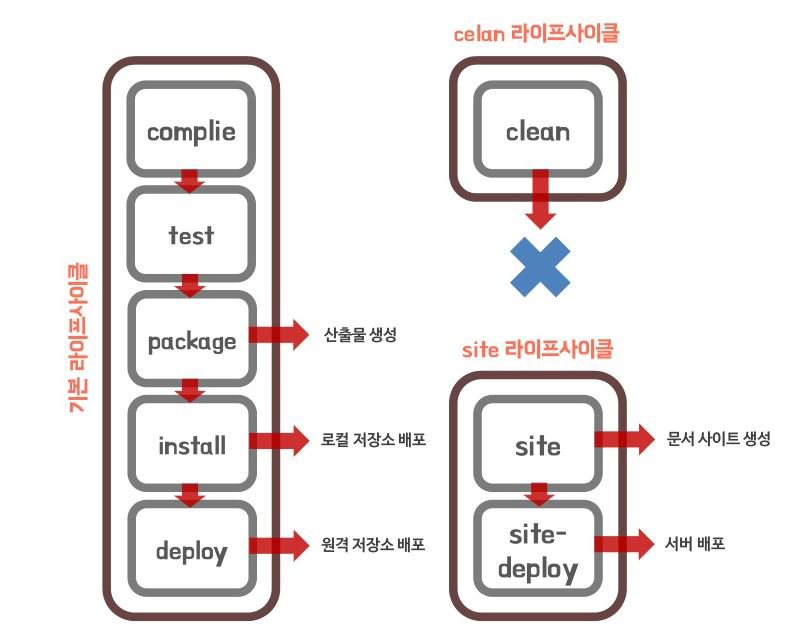
Maven의 라이프사이클 종류는 위 이미지에서와 같이 3가지 Default(기본), Clean 그리고 Site가 있고, 각 라이프사이클 안에 phase(compile, test, package….)가 존재합니다.
각 phase를 통해 Maven 명령을 내릴 수 있고, 나중 단계의 phase를 실행 시켰다면 이전 단계가 모두 실행 되어집니다. 예를들어 “mvn install”이라는 명령을 내리면 compile 부터 install 단계까지 모두 실행이 됩니다.
이클립스를 사용하면서 Run As… Maven install, Maven clean 등 빌드시킬때 사용하던 명령 들이 바로 라이프사이클의 각 phase 단계를 실행 시켜주는 것이었습니다.
각 phase에는 plugin이 존재하고 해당 plugin에서 수행 가능한 명령을 goal 이라고 합니다.
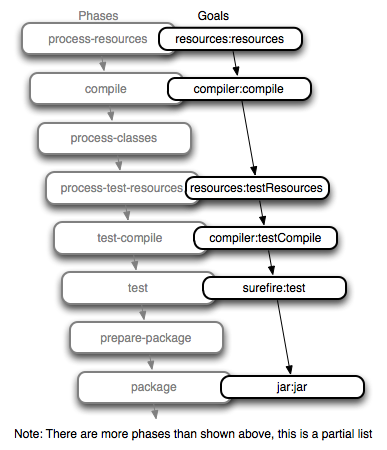
기본 라이프 사이클
기본 라이프사이클은 총 5단계로 이루어져 있습니다.
- Compile
- 명령 : mvn compile
- 소스코드를 컴파일해주는 단계입니다. 성공적으로 컴파일이 된다면 target/classes폴더가 만들어지고 컴파일된 class파일이 생성된다.
Test 명령 : mvn test
테스트 코드를 실행해주는 단계입니다. 실패하면 빌드가 멈춥니다. 이 단계에서 target/test-classes폴더와 안에 컴파일된 class파일이 생성되고 target/surefire-reports 폴더에 테스트 결과가 기록됩니다.
Package 명령 : mvn package
해당 프로젝트를 지정한 확장자로 묶어주는 단계입니다. 확장자 타입은 pom.xml에 packaging 태그로 묶이게 되고
“artifactId-version.packaging”형태의 파일을 target폴더안에 생성해줍니다.
install 명령 : mvn install
로컬 리포지토리 즉 Maven이 설치되어 있는 PC에 배포하게 됩니다.
deploy 명령 : mvn deploy
원격 리포지토리가 등록되어 있다면 해당 원격 리포지토리에 배포하게 됩니다.
Clean 라이프 사이클
Clean 라이프사이클 명령 : mvn clean
생성된 target 폴더를 삭제해버립니다.
jar 파일 만들기
jar : java archive
packaging a Maven project into an executable Jar file. When creating a jar file, we usually want to run it easily, We don’t need any additional dependencies to create an executable jar. We just need to create a Maven Java project and have at least one class with the main(…) method. In our example, we created Java class named ExecutableMavenJar. We also need to make sure that our pom.xml contains these elements:
- The most important aspect here is the type — to create an executable jar, double-check the configuration uses a jar type. Now we can start using the various solutions.
1
2
3
4
5
<modelVersion>4.0.0</modelVersion>
<groupId>com.baeldung</groupId>
<artifactId>core-java</artifactId>
<version>0.1.0-SNAPSHOT</version>
<packaging>jar</packaging>
기본 properties (설정파일)
‘target’ 폴더 ${project.build.directory} = ${pom.build.directory}
‘target/classes’ 폴더 ${project.build.outputDirectory}
프로젝트 이름 ${project.name} = ${pom.name}
프로젝트 버전 ${project.version} = ${pom.version} = ${version}
최종 파일 이름 ${project.build.finalName}
pom.xml이 위치하는 디렉토리 ${basedir}
Manual Configuration
- Let’s start with a manual approach with the help of the maven-dependency-plugin.
We’ll begin by copying all required dependencies into the folder that we’ll specify:
- First, we specify the goal copy-dependencies, which tells Maven to copy these dependencies into the specified outputDirectory.
- In our case, we’ll create a folder named libs inside the project build directory (which is usually the target folder).
1
2
3
4
5
6
7
8
9
10
11
12
13
14
15
16
17
18
<plugin>
    <groupId>org.apache.maven.plugins</groupId>
    <artifactId>maven-dependency-plugin</artifactId>
    <executions>
        <execution>
            <id>copy-dependencies</id>
            <phase>prepare-package</phase>
            <goals>
                <goal>copy-dependencies</goal>
            </goals>
            <configuration>
                <outputDirectory>
                    ${project.build.directory}/libs
                </outputDirectory>
            </configuration>
        </execution>
    </executions>
</plugin>
- Second, we are going to create executable and classpath-aware jar, with the link to the dependencies copied in the first step:
1
2
3
4
5
6
7
8
9
10
11
12
13
14
15
<plugin>
    <groupId>org.apache.maven.plugins</groupId>
    <artifactId>maven-jar-plugin</artifactId>
    <configuration>
        <archive>
            <manifest>
                <addClasspath>true</addClasspath>
                <classpathPrefix>libs/</classpathPrefix>
                <mainClass>
                    com.baeldung.executable.ExecutableMavenJar
                </mainClass>
            </manifest>
        </archive>
    </configuration>
</plugin>
Apache Maven Assembly Plugin
- The Apache Maven Assembly Plugin allows users to aggregate the project output along with its dependencies, modules, site documentation, and other files into a single, runnable package.
- The main goal in the assembly plugin is the single goal, which is used to create all assemblies (all other goals are deprecated and will be removed in a future release).
1
2
3
4
5
6
7
8
9
10
11
12
13
14
15
16
17
18
19
20
21
22
23
24
<plugin>
    <groupId>org.apache.maven.plugins</groupId>
    <artifactId>maven-assembly-plugin</artifactId>
    <executions>
        <execution>
            <phase>package</phase>
            <goals>
                <goal>single</goal>
            </goals>
            <configuration>
                <archive>
                <manifest>
                    <mainClass>
                        com.baeldung.executable.ExecutableMavenJar
                    </mainClass>
                </manifest>
                </archive>
                <descriptorRefs>
                    <descriptorRef>jar-with-dependencies</descriptorRef>
                </descriptorRefs>
            </configuration>
        </execution>
    </executions>
</plugin>